6 Steps to Secure Team Accounts in One Week for Landlords and Agencies
15 September 2026
9 min read
Replace shared logins with individual team accounts in one week. Follow six setup steps, enforce backend permission checks, and run quarterly access reviews.
Property team accounts are multi-user logins that replace one shared password with individual, role-based access for each landlord, leasing agent, and accountant on a portfolio. The immediate step, if you are still running one office login, is simple: create individual accounts for every staff member and disable the shared credentials this week. Platforms with agency plans often build this in as standard, alongside verification that keeps portfolio management traceable to a named person; see real estate marketing and agencies for operational benefits of unified team management and centralised workflows.
TL;DR:
Creating individual accounts for each staff member ensures accountability and prevents mistakes like tone contamination or unauthorized edits.
Four core roles—Viewer, Leasing agent, Accountant, and Admin—cover most operational needs, with narrow roles preferred for special cases.
Permissions must be enforced at the data level, not just in the interface, to effectively restrict sensitive information and operations.
Regularly reviewing access logs, export history, and recertifying roles minimizes risks from abandoned accounts and unauthorized changes.
Using workspace isolation and audit trails helps prevent cross-portfolio mistakes and enables quick detection of operational errors.
#financial reporting for properties#accounts for property managers#managing property accounts#property team bookkeeping#property team financial strategies#property team accounts#real estate team accounts#property management finances#property finance solutions#how to manage property finances#real estate accounting#accounting services for real estate
What are property team accounts and why do they matter?
A property team account gives each person in your business their own login, tied to a role that defines exactly what they can see and change. Instead of one office password shared across five staff, you get five identities, each mapped to a job: leasing, accounting, admin.
The gap between these two setups shows up fast in daily operations. Shared logins mean a leasing agent's casual reply can go out under the same identity as the landlord's formal rent notice, a mistake commonly called tone contamination when it happens across client portfolios. Someone reassigns a property to the wrong agent because nobody can tell who last touched the record. A junior staff member edits a rate by accident, and there is no way to trace who did it or when.
Individual accounts fix the accountability gap directly. Every action, from a rate change to a message sent to a tenant, ties back to one person. That alone speeds up how a team handles leads: a leasing agent scoped to conversations and viewings does not need to hunt through admin menus to answer a tenant query, so response times improve simply because nobody is working around a system built for one generic user.
Which roles and permissions should a property team use?
Four roles cover most of what a small landlord or a mid-sized agency actually needs. Role-based access control for property teams research suggests a compact, hierarchical set of roles, such as Owner, Manager, Agent, and Viewer, handles the bulk of operational demand better than handing out broad admin rights by default.
A practical starter set for lettings looks like this:
Viewer: read-only access to listings, tenant enquiries, and reports; cannot edit, publish, or export data.
Leasing agent: can view and respond to enquiries, schedule viewings, and update listing status, but cannot change rates or export tenant data in bulk.
Accountant: can view and export financial records and rent schedules, but has no access to publish listings or edit tenant profiles.
Admin: full access, including rate changes, bulk publishing, and user management, reserved for one or two trusted people per portfolio.
Hybrid roles exist, and they are fine in small teams, a landlord who does their own leasing and bookkeeping does not need four separate logins. The rule that matters is inheritance: build narrow, custom roles for edge cases (a part-time contractor who only handles photography uploads, say) rather than defaulting them to Admin because it is quicker. Role-based access control works precisely because it restricts sensitive data to the people who genuinely need it, not because it is more paperwork.
How do you set up team accounts step by step?
Rolling out property team accounts does not need a big-bang migration. A one-week plan, run properly, gets a small agency or landlord fully switched over without disrupting live leads.
Create individual accounts using each person's work email, with a password policy that requires a unique, non-shared credential per user.
Assign the most restrictive role that still lets someone do their job. Start a leasing agent as Viewer-plus-messaging rather than Admin, and expand only if the work genuinely requires it.
Run the old shared account in parallel for seven days. This gives staff time to adjust without losing access to live conversations or bookings mid-week.
Document each role in a one-page reference (what it can see, what it can do) and walk new staff through it during onboarding, not after a mistake happens.
Disable the shared login entirely once the parallel run ends. Keep no fallback shared password anywhere in the business.
Set a calendar reminder for quarterly access reviews, so roles get checked against who actually still works on each portfolio.
Urgent access requests happen. A leasing agent covering for a colleague on holiday, for instance, needs a fast but logged escalation path, not a shared password handed over informally. Grant temporary elevated access with an end date attached, and record who approved it.
Pro Tip:Never grant Admin access "just for a week" without a hard expiry date in the system itself. Temporary access that nobody remembers to revoke is how shared-login habits creep back in.
Why permissions need to be enforced at the data level
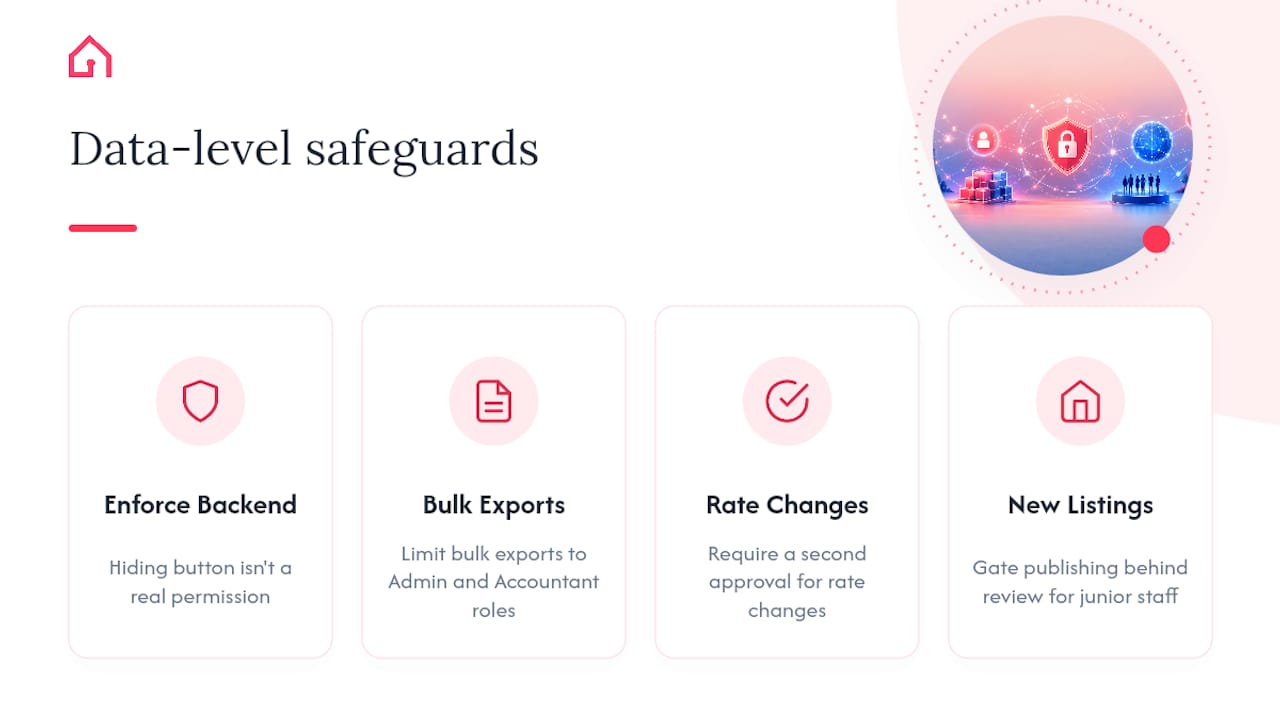
A permission that only hides a button in the interface is not a real permission. If a leasing agent's dashboard hides bulk export, but the underlying API or database still lets that same login pull every tenant's financial history, you have not actually restricted anything. You have hidden a door, not locked it.
This distinction matters when evaluating any property management platform. Ask a vendor directly: are permissions enforced in the backend API, or only in what the interface displays? Are there audit logs that record who changed a rate or exported a file, and can you review them? Are exports and rate changes gated behind an approval step, or can any logged-in user trigger them instantly?
Properly configured roles and permissions protect data integrity and reduce operational errors, but only when they are enforced where the data actually lives. Practical safeguards worth insisting on: limit bulk exports to Admin and Accountant roles, require a second approval for rate changes, and gate publishing of new listings behind a review step for junior staff.
How do workspace isolation and audit trails reduce mistakes?
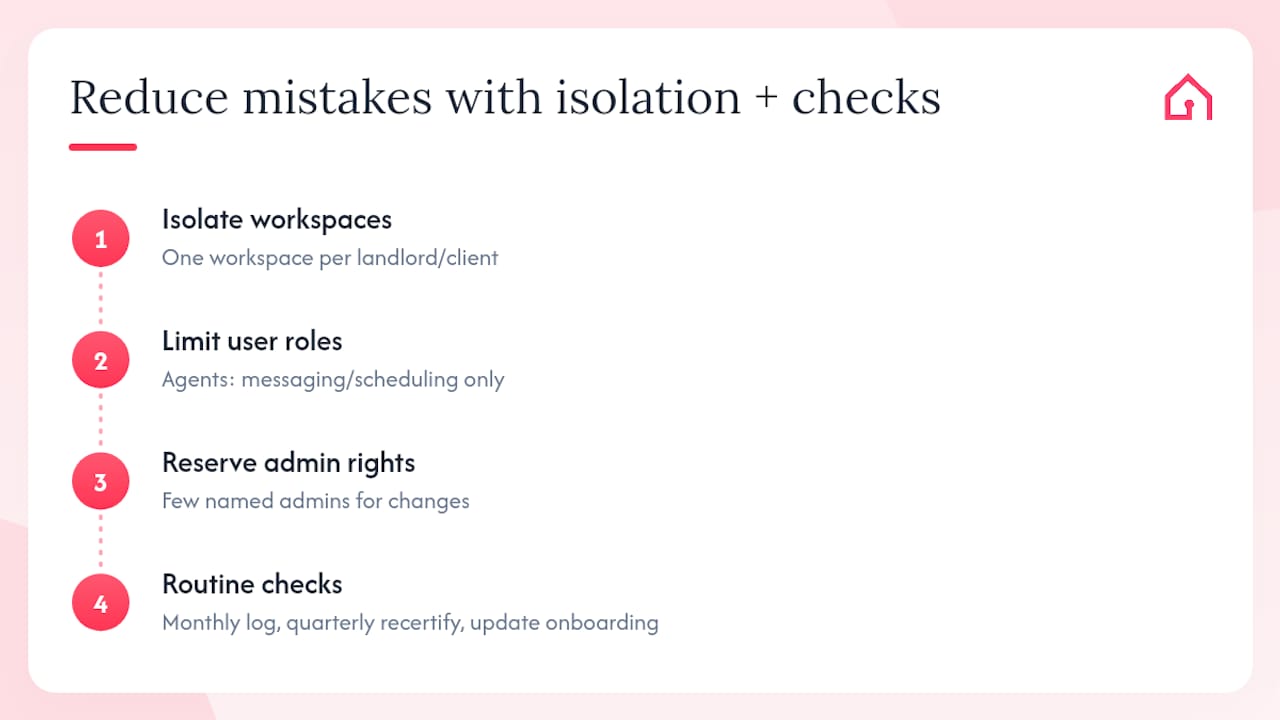
Treat each landlord's portfolio, or each client relationship if you run an agency, as its own workspace wherever your platform allows it. Workspace-per-landlord isolation is a structural defence against the kind of mistake that is hard to catch after the fact: a message meant for one landlord's tenants going out under another's listing, or a rate change applied to the wrong property because two portfolios sat in the same view.
Scope your highest-volume users, usually leasing agents, to interaction tasks only: messaging, scheduling, status updates. Reserve rate changes, bulk publishing, and user management for a small, named group of administrators. This is not about distrust; it is about limiting how much damage a single mistake or a single compromised login can do.
Build three routine checks into the calendar rather than leaving them to memory: a monthly audit log review, a quarterly access recertification (who still needs what), and onboarding documentation that gets updated every time a role changes. None of these take long individually. Skipped consistently, they are how agencies end up with five ex-staff accounts still holding Admin rights two years after someone left.
Practical checklist for onboarding and quarterly reviews
Four roles cover most operational needs, according to research on rental team permission tiers, so start strict and expand only by exception rather than granting broad access up front.
First 30 days:
Individual accounts created for every staff member, shared logins scheduled for shutdown.
Roles assigned using the Viewer, Leasing agent, Accountant, Admin template.
Seven-day parallel run completed before shared credentials are disabled.
Staff trained on what their role can and cannot do.
Every quarter:
Remove accounts for anyone who has left or changed function.
Review export logs and rate-change history for anything unexplained.
Recertify each role against current job responsibilities.
Spot-check audit trails for at least one property per portfolio.
Why Hauzed builds team accounts around verification
Verified tenant profiles cut the triage time a team spends deciding who is worth a reply, which matters more once several people share responsibility for one inbox. Hauzed's tenant profile system is built on that logic: agencies get scoped workflows rather than one flat login, so a leasing agent sees what they need without touching rate data or admin controls.
This section will incorporate first-hand case studies, client feedback, and measured AI impact data as that evidence becomes available.
— Hauzed
Where to set up team accounts and AI-assisted workflows
Some platforms offer plans built for the setup described above: agencies get team accounts, bulk publish from CSV or Excel files, and broader access to AI agents that handle tenant matching and message follow-up, so leasing agents are not stuck manually filtering every enquiry.
Hauzer, Hauzed's tenant-matching agent, works alongside team accounts rather than replacing the role structure: it surfaces likely matches for a property, but a scoped leasing agent still handles the conversation and a scoped admin still approves the listing changes. Echo helps with reply speed on high-volume threads, useful precisely because a team account setup means several people are covering that inbox, not one overloaded owner. Details on AI Team features and plan limits sit on Hauzed's agents page, and full pricing for the Free Plan and Full Assistance Pack is on the pricing page.
If your agency is still running on one shared login and a spreadsheet, the practical next step is to check plan details against your portfolio size and get in touch about agency onboarding before your next lease cycle starts.
A property team account is an individual, role-based login for one person in a landlord or agency team, replacing a single shared password with separate identities tied to defined permissions.
How many roles does a small agency actually need?
Four roles, Viewer, Leasing agent, Accountant, and Admin, cover most day-to-day needs; custom narrow roles should only be built for genuine edge cases.
Why is a shared login risky for a property team?
A shared login makes it impossible to trace who made a change, replied to a tenant, or edited a rate, which removes accountability and increases the chance of unreviewed mistakes.
Does Hauzed support team accounts for agencies?
Yes. Hauzed's Max plan includes team accounts, bulk publishing, and access to AI agents like Hauzer and Echo, with pricing details available on the pricing page.
How often should access permissions be reviewed?
Quarterly reviews are a reasonable minimum: check for stale accounts, recertify roles against current responsibilities, and spot-check export and rate-change logs each time.